3 Best Google Docs Invoice Templates and Alternatives (2026 Guide)
Google Docs templates are perfect for micro-businesses with zero budget, but they lack automation. For freelancers scaling up, Invoala provides automated tax and currency math, while Wave Financial offers full-cycle accounting. This guide helps you choose the right tool based on your monthly invoice volume and billing complexity.
By Invoala Editorial Team · Published 2026-09-24
How many hours do you spend manually typing line items and calculating taxes into a document before you realize your billing process is broken? For most freelancers and small business owners, the search for the perfect Google Docs invoice template is actually a search for a faster way to get paid without the headache of manual data entry.
Most people start with Google Docs because it is free and familiar. It allows for total control over branding and layout, which is helpful when you are just starting out. However, the real evaluation standard for a professional invoicing workflow is not just how the document looks. A professional system must handle the math for you, manage different currencies, and provide a clear record of which clients have actually opened their bills.
You can choose between three distinct paths for your billing. Static templates offer the most design flexibility but require you to do every calculation yourself. Dedicated invoice makers like Invoala bridge the gap by automating tax math and payment tracking without the weight of a full accounting suite. Comprehensive platforms like Wave Financial handle the entire books, from banking to tax season reporting, for those who need more than just a document.
This guide evaluates these options based on speed, accuracy, and cost. If you are tired of manual math errors or chasing clients for payment status, look for a solution that moves beyond a simple word processor. Use the following breakdown to decide if you need a better template or a smarter tool to manage your business revenue.
Why Google Docs Invoice Templates are the Starting Point for Most Freelancers
Most freelancers begin their billing journey with google docs invoice templates because the barrier to entry is non-existent. If you already use Google Workspace for your documents and spreadsheets, creating an invoice feels like a natural extension of your existing workflow. These templates provide a professional layout that you can customize with your logo and brand colors without needing specialized design software or a monthly subscription.
A standard professional invoice in Google Docs should include several non-negotiable fields to ensure you get paid on time. You need your contact information and the client's details at the top, followed by a unique invoice number for tracking. The core of the document is the itemized list of services or products, where you describe the work, the quantity, and the rate. Finally, clear payment terms and instructions, such as a bank transfer ID or a digital payment link, must be visible at the bottom to prevent confusion.
The primary advantage here is flexibility. You can tweak the margins, change the fonts, or add a personalized thank-you note to every client. This collaborative environment also allows clients to leave comments if they have questions about a specific line item before you finalize the document as a PDF. While this manual process works well for one or two clients, it sets the foundation for understanding what a professional billing document requires before you scale to more automated systems.
1. Invoala
Invoala is a dedicated invoicing tool built for freelancers and small agency owners who find manual document editing too slow for a growing client list. It handles the specific task of turning project details into professional, PDF-ready invoices without the overhead of a full accounting suite. The platform is designed to be accessible, allowing users to move from a blank screen to a finished bill in a few clicks.
The platform focuses on the math problem inherent in standard Google Docs templates. While a doc requires you to manually calculate totals, taxes, and currency conversions, Invoala automates these steps in real time. This reduces the risk of errors when billing international clients and ensures that every document sent out maintains a consistent, high-standard brand appearance.
Best for automated tax and global billing
This tool fits professionals who have moved past the stage of sending one invoice a month and need a system that tracks what has been sent and what remains unpaid. It is particularly useful for those working across borders where VAT or GST calculations can become complicated in a static document.
What stands out in actual use:
- Zero-friction start: You can generate a basic invoice without creating an account, which is a significant time-saver for one-off projects.
- Global readiness: The system handles multiple currencies and tax rates automatically, ensuring your totals are always accurate.
- Status visibility: You can see when a client has opened the invoice, removing the guesswork from payment follow-ups.
- Team collaboration: Agencies can manage multiple clients and allow team members to collaborate on billing workflows.
Invoala is not an ERP or a full-scale payroll manager. If you have dozens of employees and need complex financial reporting for a board of directors, you will likely need a heavier tool like QuickBooks. It is designed for lean operations that prioritize speed and accuracy over deep financial data mining.
It is the middle ground for users who want the simplicity of a template but the intelligence of a database.
Solving the Scaling Wall
Manual Google Docs templates work fine until you reach a certain volume. Once you are sending five or more invoices a month, the time spent copying, pasting, and double-checking math starts to eat into billable hours. Invoala removes this Scaling Wall by providing a structured invoice maker that keeps your data organized. By moving away from manual entry, you avoid the common trap of forgetting to update an invoice number or miscalculating a tax percentage.
Professionalism and Tracking
A common issue with manual docs is the lack of a clear way to track payment status. Invoala allows for real-time tracking, so you know exactly which invoices are pending. This professional polish, combined with the ability to generate quotes and estimates, helps small businesses look more established to their clients. If you still prefer the layout of a document but want a better starting point, you can also utilize their free invoice templates to ensure your branding stays sharp.
2. Google Docs
Google Docs serves as the entry point for many freelancers and micro-businesses who need a 100% free way to bill clients. It functions as a flexible canvas where you can build an invoice from scratch or adapt one of the many community-made templates available online. For users already embedded in the Google Workspace ecosystem, it requires zero new accounts and zero additional costs.
The primary draw here is the total control over the document layout. You are not restricted by the rigid fields of a dedicated billing app. If you need to add a long project description, a custom branding element, or a specific legal disclaimer that does not fit in a standard box, Google Docs lets you place it anywhere on the page.
Best for micro-businesses with zero budget and highly specific layout needs
This tool is the right fit for contractors who send only one or two invoices a month and prioritize design flexibility over speed. It works well when every project is unique and requires a tailored breakdown that automated tools might struggle to format.
What stands out in actual use:
- Total Design Freedom: You can modify margins, fonts, and colors to match your brand identity perfectly without paying for a premium white-label feature.
- Native Collaboration: You can share the draft with a partner or project manager for review using real-time comments before finalizing the PDF.
- Version History: If you accidentally delete a line item or overwrite a previous month's bill, you can revert to an earlier version with a few clicks.
The main drawback is the Scaling Wall where manual entry becomes a liability. Because Google Docs lacks built-in math functions, you must calculate taxes, discounts, and totals by hand. This increases the risk of human error, especially when dealing with multiple currencies. There is also no native way to track if a client has opened the document or to automate late payment reminders.
Google Docs remains the manual standard for those who value customization and have the time to handle the data entry themselves.
3. Wave Financial: Best for Full-Cycle Accounting
Wave Financial serves small business owners who have outgrown the manual data entry of google docs invoice templates and need a system that handles the entire financial lifecycle. It moves beyond simple document creation by connecting directly to bank accounts and organizing transactions for tax season.
The platform provides a structured environment where invoicing is the starting point for broader bookkeeping. By automating the connection between a sent invoice and a received payment in your bank feed, it eliminates the need to manually cross-reference spreadsheets or documents.
Best for small businesses requiring bank syncing and tax readiness
Businesses that need to see their cash flow in real time will find Wave more effective than a static template. It is built for those who want their invoicing data to flow directly into their accounting reports without manual exports. This is a significant step up for users who find that manual google docs invoice templates no longer provide the financial visibility required to manage a growing company. This automation prevents the math errors common when calculating taxes manually on a document.
What stands out in actual use:
- Unlimited Invoicing: The Starter plan allows you to send as many invoices as needed without hitting a monthly cap.
- Bank Transaction Imports: Automatically pull in data from your financial institutions to categorize income and expenses.
- Automated Reminders: Set up the system to nudge clients about overdue payments so you do not have to send manual follow-up emails.
While the invoicing features are robust, service-based freelancers might find the lack of native time-tracking a hurdle. You will need a separate tool to log hours before importing that data into your Wave invoices. The 2024 introduction of a tiered pricing model also means the Pro plan costs $19 per month for those needing advanced features.
Wave is a comprehensive financial hub for users who want to transition from making a document to running a ledger.
The 'Scaling Wall': When to Stop Using Manual Google Docs Templates
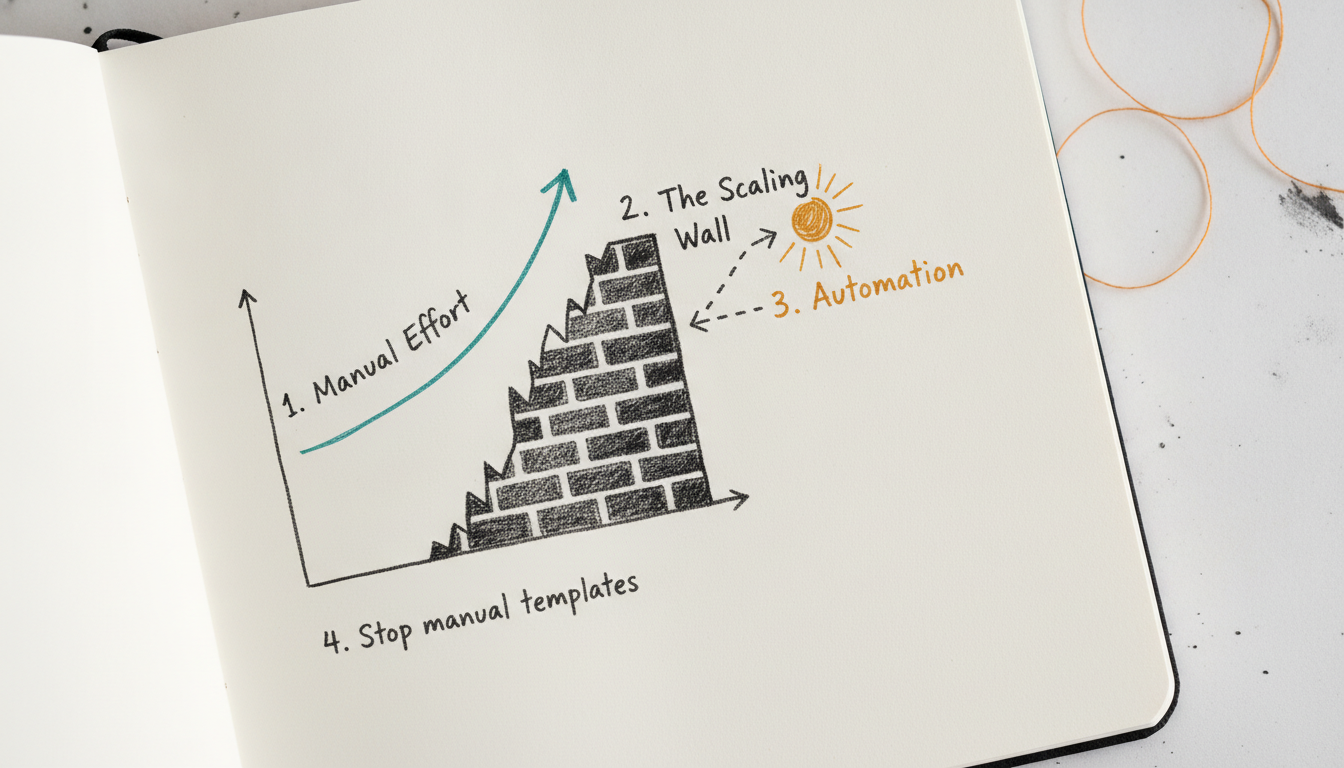
Most freelancers start with a free invoice template in Google Docs because it is familiar and costs nothing. Every growing business eventually hits the Scaling Wall. This is the point where the time spent manually updating line items and calculating taxes outweighs the cost of a dedicated tool.
The first sign you have hit this wall is the math anxiety that comes with manual entry. If you are billing international clients or applying different tax rates across services, a single typo in a Google Doc cell can lead to undercharging or embarrassing corrections. Google Docs does not have built-in logic to handle currency conversions or automated tax math.
Another risk is the lack of visibility. Once you send a PDF exported from Google Docs, it enters a black hole. You cannot see if the client opened the email, and you have to manually track due dates in a separate spreadsheet. This leads to lost invoices and delayed payments.
To maintain a professional standard as you scale, your billing process should include:
- Automatic invoice numbering to prevent duplicates.
- Clear, itemized tax breakdowns that update as you change prices.
- Integrated Pay Now links to reduce friction for the client.
- Real-time status tracking to know exactly when to follow up.
If you find yourself spending more than thirty minutes a month on manual formatting, it is time to move toward a more efficient system. Tools like Invoala help bridge this gap by automating the tedious math while keeping the process simple for those who do not need full-scale accounting software. You can find more tips on professional billing in the Invoicing Learning Center.
"You know it is time to move on when you spend more time fixing broken formatting than actually billing your clients."
Decision Matrix: Google Docs vs. Invoala vs. Accounting Software

Choosing the right billing workflow depends on your monthly volume and the complexity of your tax requirements. Use google docs invoice templates if you are just starting out and send fewer than two invoices per month. This is the right choice when you have a zero budget and need absolute control over the visual layout. You handle the math manually, which is manageable at low volumes but becomes a liability as your client list grows.
Invoala serves freelancers and agencies managing multiple clients who need to save time on manual entry. It provides a middle ground for those who need automated tax calculations and currency conversions without the overhead of full accounting software. This tool allows you to track when a client opens an invoice, helping you manage cash flow more predictably. If you want to move faster than a blank document allows, you can browse Free Invoice Templates to find a layout that fits your brand.
Move to platforms like Wave or QuickBooks once you hire employees or require complex payroll services. These tools are built for businesses that need deep financial reporting and bank synchronization for tax season. They are often overkill for solo service providers but necessary for entities with complex inventory or multi-state payroll needs. Selecting the right tool early prevents the friction of migrating data once your billing volume hits the scaling wall.
"Pick the tool that matches your current volume because a complex accounting suite often creates more admin work for a solo freelancer."
Top 3 Google Docs Invoice Templates & Alternatives: Features & Pricing Comparison
| Tool Name | Best For | Free Plan | Automated Tax/Currency | Payment Tracking |
|---|---|---|---|---|
| Invoala | Freelancers needing automated tax and currency math without complex software. | Free Forever | Yes | Yes |
| Google Docs | Micro-businesses with zero budget and highly specific layout needs. | Free for personal use | No | No |
| Wave Financial | Small businesses requiring full-cycle accounting and bank syncing. | Starter plan ($0/mo) | Yes | Yes |
Choose the Invoicing Tool That Removes Your Biggest Workflow Bottleneck
Selecting the right billing method depends on where your process breaks down. If you send one or two invoices a month, a manual google docs invoice template provides the flexibility to design a layout that matches your brand perfectly without any software overhead. This approach works until you hit the scaling wall. Once you manage multiple clients or international projects, the risk of math errors on tax calculations and the time spent manually updating invoice numbers becomes a liability.
For businesses that need a full financial ecosystem, Wave Financial offers a robust path. It handles everything from bank syncing to transaction imports, making it a strong choice for those who want their invoicing tied directly to their tax season preparation. If your primary frustration is the manual data entry of Google Docs but you find full accounting suites too cumbersome, a dedicated generator is the logical step.
Invoala serves as a practical middle ground for freelancers and agencies who need to automate the tedious parts of billing. It handles global tax and currency conversions instantly, which solves the common headache of manual math in static documents. You can track when clients open and pay invoices in real time, reducing the need for awkward follow-up emails. This helps you maintain a professional appearance without spending hours on administrative tasks.
The best way to decide is to generate a single real-world invoice in each tool. Look at the final PDF output and see how much manual effort it took to get there. If you find yourself double-checking your calculator every time you add a line item, it is likely time to move beyond a basic document. For those ready to simplify their workflow without a steep learning curve, starting with Invoala is a reliable way to ensure your billing stays professional and accurate.
Frequently Asked Questions
How do I find invoice templates in Google Docs?
You can find them by opening Google Docs and clicking on the Template Gallery in the top right corner of the home screen. Scroll down to the Work section to see various invoice and letterhead options. These templates are free to use and fully customizable for your business needs.
Can I automate calculations in a Google Docs invoice template?
Google Docs does not have built-in spreadsheet functions to automate math like tax or totals. You must manually calculate each line item and the final balance using a calculator. For automated math, you would need to use Google Sheets or a dedicated invoicing generator.
Is there a free invoice template for Google Docs?
Yes, Google provides several free invoice templates directly within the Google Workspace ecosystem. Many third-party websites also offer free downloadable templates that you can copy into your own Google Drive. These are ideal for micro-businesses with no software budget.
How do I save a Google Docs invoice as a PDF?
Click on File in the top menu, select Download, and then choose PDF Document (.pdf). This creates a non-editable version of your invoice that is professional and easy to email to clients. It ensures your formatting remains consistent regardless of the device the client uses to view it.
What are the disadvantages of using Google Docs for invoicing?
The main drawbacks include manual data entry and the lack of payment tracking. You have to manually update invoice numbers and calculate taxes, which increases the risk of human error. Additionally, Google Docs cannot tell you if a client has opened the document or paid the bill.
How does Invoala improve upon standard Google Docs templates?
Invoala automates the calculation of taxes and currency conversions which must be done manually in Google Docs. It also provides real-time tracking so you know exactly when a client views your invoice. This saves time for freelancers who find manual document management too slow as they scale.
Frequently asked questions
How do I find invoice templates in Google Docs?
You can find them by opening Google Docs and clicking on the Template Gallery in the top right corner of the home screen. Scroll down to the Work section to see various invoice and letterhead options. These templates are free to use and fully customizable for your business needs.
Can I automate calculations in a Google Docs invoice template?
Google Docs does not have built-in spreadsheet functions to automate math like tax or totals. You must manually calculate each line item and the final balance using a calculator. For automated math, you would need to use Google Sheets or a dedicated invoicing generator.
Is there a free invoice template for Google Docs?
Yes, Google provides several free invoice templates directly within the Google Workspace ecosystem. Many third-party websites also offer free downloadable templates that you can copy into your own Google Drive. These are ideal for micro-businesses with no software budget.
How do I save a Google Docs invoice as a PDF?
Click on File in the top menu, select Download, and then choose PDF Document (.pdf). This creates a non-editable version of your invoice that is professional and easy to email to clients. It ensures your formatting remains consistent regardless of the device the client uses to view it.
What are the disadvantages of using Google Docs for invoicing?
The main drawbacks include manual data entry and the lack of payment tracking. You have to manually update invoice numbers and calculate taxes, which increases the risk of human error. Additionally, Google Docs cannot tell you if a client has opened the document or paid the bill.
How does Invoala improve upon standard Google Docs templates?
Invoala automates the calculation of taxes and currency conversions which must be done manually in Google Docs. It also provides real-time tracking so you know exactly when a client views your invoice. This saves time for freelancers who find manual document management too slow as they scale.
Put it into practice
Create a professional invoice in under two minutes — free, no sign-up.
Create an invoice